Showing posts with label photoshop. Show all posts

Enne ja pärast II // Before and after II

Tuesday, June 7, 2016

Jätkates eelmise postituse vaimus, sai tehtud ka teine pilt. Kuna seekord kasutasin kahte fotot, siis on lisatud mõlemast ka GIFid, et erinevused tüdruku ja tausta osas paremini esile tuleksid.
//
Following the spirit of my last post, here's another edit. Since I used two photos, I added both GIFs showing the changes in background and the subject.

Originaalfotod pärinevad isikutelt, kelle lingid on lisatud järgnevalt:  // All credit in terms of original photo go to the people & links below:


Enne ja pärast I // Before and after I

Thursday, May 26, 2016

Sissejuhatuseks siis nii palju, et sellist jamamist - võtta foto ja sellega Photoshopis oma lõbuks tunnikese mässata - pole tükk aega ette tulnud. Sel korral tekkis tahtmine töötlusvaldkonnas proovida paari uut asja ja kuna endal sobivat pilti polnud, siis harjutamise eesmärgil sai kasutatud DeviantArti stocki.
Töötlus on üle võlli ja neiu näeb ka täitsa teine inimene välja, aga mis sellest! Vähemalt oli huvitav nokitseda :)
//
It's been a while since I've taken a photo and Photoshopped it for a good hour or so, just for fun. Today I wanted to try out some new things and for the purpose of practicing, I used a photo from the DeviantArt stock page.
Yes, sure, some might say the edit is over the top and the girl looks like a totally different person...but I have no regrets. Gotta love trying out new things :)

Originaalfoto pärineb isikult, kelle lingid on lisatud järgnevalt:  // All credit in terms of original photo goes to the person & links below:

Daniella Koontz, Koontz Photography & Design.


*Download* Photoshop resources: Pack of 9 curves

Sunday, June 17, 2012


http://www.mediafire.com/?tuqx66lg0pa7swv

Please bear in mind that I mostly use these curves for photos of nature (and that's really what they were designed for). I also tend to use a mixture of curves (23% of x; 33% of y etc), I'll never rely on the effect of just one curve (plus there are other wonderful features in PS as well).
I know most people would prefer to have curves that would look good on every photo, but unfortunately that's not possible in reality.

Also, sorry for the names, they were a last-minute thing. My curves are usually named "isdof8ufsdk", or something like that :P 

My comments on how/where:

Greens - Adds a lot of contrast + green/yellow tint.

Light breeze - Adds a blue tint and creates a softer and lighter feel. Does best with lighter images. This image was processed with a mixture of light breeze curve and a bit of something else (which I can't remember).

Miami - Very yellow/orange. I use it in moderation to add warmth to some images. It's good if you want to enhance/create a sunny photo.

For nature - Ah, a tricky one! If you have a yellow/green looking photo of grass etc, this is the one to bring out interesting colors in your shot. However, wood/dirt/brown things will look extremely purple...so that makes this curve less versatile.

Old times - I haven't really encountered a photo that didn't look the part after using this curve (no guarantees, though, very dark images are always questionable).
The result? Slightly yellow/green older-looking colors. Basically a niche preset, useful if you're into the vintage-retro stuff.

June - Not the best for very "crowded" photos. The sample image covers the basic look that this should be good for.

July - Sweet, bright and wonderful. Slightly over the top contrast/brightness, doesn't alter the colors much.

August - Bright, vivid and happy colors. Use in moderation, 100% full on might be a bit too
much!

Dream - Very bright and simple colors. It can be used on darker images but it can also look good with lighter ones to create a pure, washed out look.

1 year

Sunday, April 15, 2012

1 year ago today I lost my cat.
Since my Internet connection hasn't been the greatest, I had time to do this. A "tribute", if you will, to Miisu. It's not the best (I don't usually draw in PS + it's kind of a pain to do with a mouse), but I think it doesn't look too bad either :)


*Download* Photoshop action: Spring

*Download* Photoshop action: Rosy cheeks

Sunday, March 18, 2012


It's one of my favorite actions I've made so far, enjoy :)

http://www.mediafire.com/?td7ycj2xmq8p8pu

*Download* 2 Photoshop actions: St Tropez

*Download* Photoshop action: Cat

*Download* Photoshop action: 80s bad film

Monday, October 24, 2011

This is a vintage-retro look, I was inspired by 70s/80s images from my family's photo album. My mother said that the quality of the film was not very good, so that over time the photos turned yellowish-brown. I actually really like this look, so I decided to make an action for it.

http://www.mediafire.com/?hh4nb61t6kto16l

*Download* Photoshop action: Fresh mint

*Download* Photoshop curves: Serious

Friday, September 16, 2011


Gives a blue tint. I usually use it for photos that are way too yellow, just lowering and adjusting the opacity of this curves layer to my taste (to give a more "serious" look).

Download link below ↓
http://www.mediafire.com/?b1x9aymz6ejdja1

*Download* Photoshop action: Porcelain

*Download* Photoshop action: Vanity

*Download* Photoshop action: Summer

Monday, June 27, 2011


Download link below ↓

http://www.mediafire.com/?bw691g66d2w46jb

(Photo credit: me)

*Download* Photoshop action: Ordinary word

Sunday, June 19, 2011


Download link below ↓

http://www.mediafire.com/?2fr97qs966z895n

(photo credit: me)

*Download* Photoshop action: Terne

*Download* Photoshop action: 70s redhead

Friday, March 4, 2011


Download link below ↓

http://www.mediafire.com/?z65azzml09dp0iq

Doesn’t look like much but the name pretty much says it all. Results: not very detailed black, a bit blurry with a slight vintage-toning.

*Download* Photoshop action: Candy Vogue

Thursday, February 17, 2011

Download link: http://www.mediafire.com/?cts622yb9xhy28t

I have quite many actions to upload tbh. Trying not to overload too much :)

I’m pretty satisfied with this preset, imo it gives photos a teen Vogue-like look (pink/light/polished).

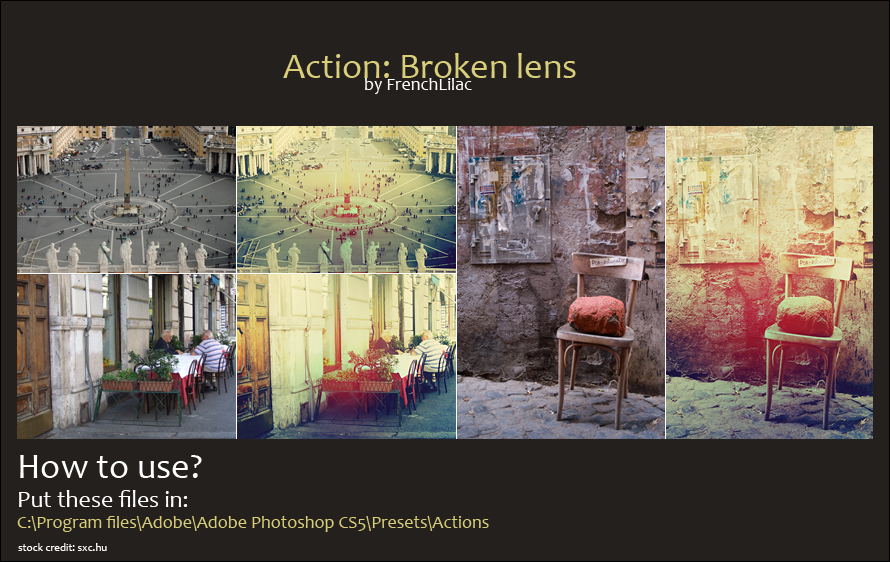
*Download* Photoshop action: Broken lens

Wednesday, February 9, 2011

Another day, another action coming your way.

“Broken lens”. I was inspired by dust, dirt and other stuff that may damage the lens. As far as I’ve tested, this one works better with photos of buildings/streets.


Download link below:

http://www.mediafire.com/?ezm6xizpd44em46

EDIT:
I grabbed some “really old” photos from 2008 (or 2007) from my HDD external and used it on them.

*Download* 2 Photoshop actions: 20s and 90s

Tuesday, February 8, 2011

Another action, uploaded couple of days ago. Clearly, my devART and tumblr are hopelessly out of sync. And I’ll have to start answering to messages of my main account as well :D

Also, watched “Don’t look now” (1973) and “Dawn of the dead” (1978). I don’t really get the hype about Don’t look now…I’d give it 6.5/10. Because it wasn’t scary at all, it was just really sad.
And Dawn of the dead was pretty cool. I enjoyed the feeling it gave me. Zombie apocalypse in its full glory.


Download link below:

http://www.mediafire.com/?ezm6xizpd44em46